
Pata Classified ads website project kwa bei poa
Technology homesite pamoja na dmax.co.tz ambalo linahusika na web design,domain registration,hosting,app development,online marketing project,graphics design tunawaletea project hii ya website ya matangazo.Yaani unamiliki soko ambalo watu watakuwa wanaweka bidhaa zao na wewe unachaguia njia nzuri ya kupata kodi kutokana na mauzo yao.


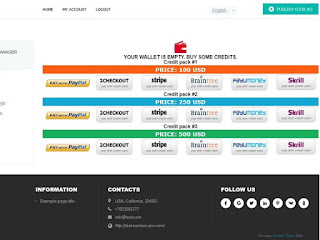


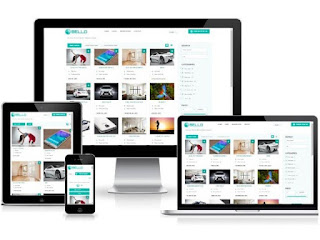
Project inakuja na mfumo wa malipo kama paypal,bank transfer na mingine mingi pia hata m pesa na tigo pesa unapokea na unafanya configuration manual na biashara inaendelea hizi ni website kama kupatana.com.
Tnafanya configuration,hosting kwa 280,000 TZS
NJOO TUONGEE
wasiliana nasi
+255 (0) 767 176 929 telegram
+255 (0) 715 196 071 whatsapp
Email:medsonnaftal@gmail.com
HIZI APA CHINI NI SCREENSHORT ZA WEBSITE HYO NA BAADHI YA MIFUMO ILIVYO


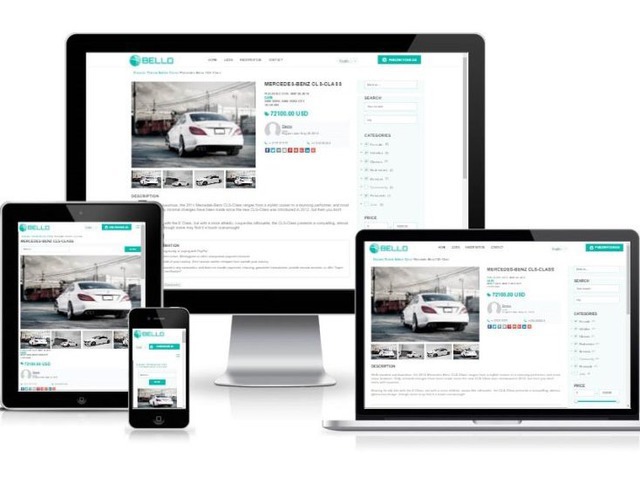

MAELEZO YA TEMPLATE
This is a new professional theme. A professional design for the most user-friendly websites.
1 . Full Responsive
2 . Bootstrap , HTML5, CSS3
3 . Сarousel
In the main page with custom settings:
a) select number of items to show in carousel from theme settings
b) select to show premium or popular items
c) hide carousel
4 . Social networks
a) Share buttons in item page.
b) Links to you social pages in footer ( past from oc-admin)
5. Google Map
In item page. Settings to enable/disable. Filed for Google Map API key in theme settings.
6 . Related ads
Related Ads in item page.
Related Ads function allows to set to the administrator various settings:
a) number of relates ads in item page;
b) ads with photos only оr not;
c) ads only from the same region оr not;
d) ads only from the same same categoryоr not;
e) Premium ads only or not;
f) Any combination of the previous functions for Related Ads
7. Advertise Managment
From theme settings for platforms, such as Google Adsense.
8. Gallery or List View.
The administrator can choose - as will be shown by default.
9. Custom Welcome text in Main Page
Text paste in theme settings or disable.
10.New option for main search. Now you can upload/replace background image from theme settings.
Or just select color with colorpicker
11. Contacts
Contacts in footer past from settings.
12. Very Easy to install.
No need edit the code. No need plugins to install theme.
13. Widgets
Three widget in footer. Here you can insertany widget that you want, or just text.
14. Main page search can be configured to use :
a) Search in all regions
b) Search in regions only with items
c) Search in All cities ( It is advisable to use if you have a few regions or one. If you have a lot of regions - the main page will be a long time to load.)
d) Search in Cities with items only
e) Search in Countries with items
f) Hide locations search
15. Icons for categories
Can be replaced (or upload for new categories) from theme settings.
16. Item-post
Post item with country select or not, show custom field after categories or at bottom.
17. Disable/enable: category icons in items, subcategories in category page, mark as and useful block in item page.
18. New option for footer. You can select background color with colorpicker
19. Full translated: English, Spanish(Spain), Portuguese(Brazil), Portuguese(Portugal), Russian, German, French, Italian.
And full ready to translate to any other language. It is very easy to do:
https://doc.osclass.org/Translating_and_editing_language_files_%28.po_and_.mo%29
PAYMENT SYSTEM
Ultimate Payments.
The perfect plugin is a perfect tool to make an additional income from your website. Plugin allow users pay Premium, Move to Top, Highlight and Pay Publication on the classified website. Ultimate payments allows you to work with Paypal, Stripe, Braintree, 2Checkout, Payumoney, Skrill and will be more.
SEO FRIENDLY
SEO PRO plugin will help you optimize site .
ULTIMATE PAYMENT
Ultimate payments allows you to work with Paypal, Stripe, Braintree, 2Checkout, Payumoney, Skrill, Fortumo (SMS payments, Work only in Wallet), Blockchain (Bitcoins) and will be more!
Premium
Premium is feature for Osclass when the listing shown on top of free ads. The plugin allows to automate this process. Any user can pay - Premium. Administrator can easily configure the price and the number of days which the listing will be displayed as Premium. You can set a default price for all categories and also set different one for each category.
Move to Top
User can pay Move to Top. This function move listing once to Top of the category and the main page too. These listing rise above free listings, but below the Premium (if there are some) and will be decreased by newly listed ads by other users. You can set a default price for all categories and also set different one for each category.
Highlight
This option allows to attract the visitors' attention to listing, using background color different from other listings. Administrator can easily configure the number of days which the listing will be displayed as Highlighted. You can set a default price for all categories and also set different one for each category.
Premium and Highlight with discount
You can set a discount for a Premium with Highlight. If the user buy two services at once(Premium with Highlight),the price will be cheaper. And maybe this will allow you to increase sales.
Pay Publish
If enable this option - the user must Pay Publish listings. User can ad a new listing, click the publish button, but it will be visible on the website after the payment is released. You can set a default price for all categories and also set different one for each category. If enabled Premium - user can pay Publish with Premium. If enabled Highlight - user can pay Publish with Highlight. If enable Premium and Highlight - user can pay Publish with Premium andHighlight with discount.
Publish Policy
You can enable Pay Publish and setup Publish Policy for each category:
1) All published items must be paid in category
2) All items can be published for free in category
3) The user can publish the set by you number of ads for free, and after he must pay for the publication of the new item in this category.
Wallet
The user can transfer a sum of money in his wallet on the site. And then pay for premium services ( Premium, Move to Top and Highlight) with Wallet.
After publish
If this feature is enabled. User after the published ad redirect to page immediately offered to pay Premium and Highlighting(Or/and Pay Publish).This allows you to get more payments. Bottom of the After publish page there is a button - no thanks. The user can press it and nothing pay at once - publish a classified. And pay premium option later from the personal account.
Item publish form
The user can choose the services right in the listing post page. In bottom of page immediately offered to pay Premium and Highlighting (Or/and Pay Publish).
Add bonus
Admin can add bonus credits in the user Wallet. This allow user to try premium functions. Or the administrator can give a bonus to the user which just constantly use the premium features of the site.
Bonus for signup user
If you enable this option, for each new user will be added bonus to a wallet. Bonus value you can specify in plugin settings.
Logs
The administrator can see all of the payments that have been made on the site. Amounts, User ID, User email, Item ID and which premium feature is paid by user.
E-mail Notification
1) Notification e-mail to user if admin mark item as Premium, Move to TOP, Highlight
2) Notification e-mail to user after publish item with a proposal to buy Premium or Highlight
3) Notification e-mail about the expiry date of the services to user. The administrator can configure the number of days before the end of the service need send a e-mail to user.
Options on the item page
If the user is logged on the site - he can pay from item page: Premium, Move to TOP, Highlight or Premium and Highlight with discount.
If admin logged on oc-admin - he can Mark item: Premium, Move to TOP or Highlight as admin without payment.
Options in user account
User can pay or reneview all services from personal account.
The user sees how many days are before the end of the service.
User can see log of his payments in personal account.
Changelog
3.2.0.
- Blockchain ( Bitcoins) added.
- New function Bonus for signup user
3.4.1
- Minor bug fixes
- New option - Item publish form
- IMPORTANT. After UPDATE - Disable and Enable plugin to take effect
You can enable/disable any payment system as you want!
IMPORTANT:
1. Plugin is translated to English, Spanish, Portuguese(Brazil), Portuguese(Portuguese),Italian.
Full Ready to translate to any other language.
Translate is very easy and takes little time. How to do it:
https://doc.osclass.org/Translating_and_editing_language_files_%28.po_and_.mo%29
2. PHP 5.4 or higher is required
3. You may need to sign up for third party services as Paypal, 2Checkout, Stripe, Braintree, Payumoney and other payment systems in order to configure those method of payments for the plugin
4. Highlight option for work requires small changes in the theme files. Read Help in admin part of plugin.
5. Not compatible with plugin "Paypal plus". After publish and Publish options not compatible with plugin "Item Social Share".
If you have any difficulties with the configuration Highlight or any other difficulties, please Open a support ticket. I for free can help you configure all functions. If you have opened a ticket - Please wait. Perhaps we have a big difference in the time zones.
